
In 2023, I took on the challenge of leading digital transformation at the Organization of American States (OAS), a 35-member multilateral body, as Chief of Applications and Platforms Development Section. The mission was to modernize critical applications, shift to a full Microsoft Architecture, and boost IT efficiency and user satisfaction—all while navigating a complex landscape of diverse stakeholders with competing priorities. Imagine conducting an orchestra where every musician insists on playing a different instrument, and you're close to the reality I faced.
This blog post is my playbook, drawn from that experience. It's a practical guide for anyone tackling a similar transformation—whether you're a technical leader, an IT professional, or just curious about how to orchestrate change in a challenging environment. I've laid out a high-level roadmap and broken it into actionable "Plays" covering application rationalization, analytics setup, robotic process automation (RPA), database transformation, enterprise data modeling, and operational planning. Along the way, I'll weave in how Microsoft Dynamics 365 and Power Apps played a pivotal role, offering guidelines, checklists, and lessons learned for each step. Let's get started.
The Roadmap: From Zero to Modernized Architecture
Here's the high-level roadmap I followed at OAS, starting from a fragmented IT ecosystem and building toward a unified Microsoft Architecture. These milestones provide a blueprint adaptable to any organization:
- Assessment & Vision (Months 1-2): Inventory systems, define the target state (Azure, Dynamics 365, Power Platform), and align stakeholders.
- Application Rationalization (Months 3-5): Evaluate and streamline the application portfolio.
- Analytics Foundation (Months 6-8): Set up a Microsoft cloud-based data platform and warehouse.
- Core Migration (Months 9-12): Migrate infrastructure to Azure, modernize databases, and deploy Dynamics 365 and Power Apps.
- Automation & Optimization (Months 13-15): Roll out RPA and refine operations.
- Scale & Sustain (Months 16-18): Establish an enterprise data model and operationalize the architecture.
Now, let's dive into the Plays.
Play 1: Application Rationalization – Streamline the Portfolio
The Context: Every transformation starts with understanding what you've got. At OAS, we faced a sprawl of legacy applications—some outdated, others redundant—supporting a 35-member organization with varied needs. Rationalizing this portfolio was about cutting fat, aligning with business goals, and setting the stage for a Microsoft-centric future. This Play is about making tough calls on what stays, what goes, and what gets a makeover.
Guidelines:
- Inventory all applications and classify them: Retire, Replace, Rehost, Replatform, or Refactor.
- Prioritize based on business value, technical debt, and fit with Dynamics 365 or Power Apps.
- At OAS, we replaced a legacy ERP with Dynamics 365 Finance & Operations and shifted custom apps to Power Platform, slashing costs and complexity.
Checklist:
- Map applications to business processes.
- Assess usage, cost, and support needs.
- Identify overlaps with Dynamics 365 or Power Apps.
- Document retirement/migration plans.
Guiding Questions:
- Which apps duplicate Dynamics 365 functionality?
- Can Power Apps replace custom solutions?
- What's the risk of clinging to legacy systems?
Lessons Learned:
- Stakeholder workshops bridged the gap between IT's desire to preserve and business units' push for simplicity.
- Early wins, like retiring a redundant CRM, built trust and momentum.
Play 2: Analytics Setup – Build Insights with Microsoft Cloud
The Context: Data is the lifeblood of transformation, but at OAS, it was scattered across silos, delaying decisions and frustrating users. This Play focuses on creating a scalable analytics foundation using Microsoft's cloud tools—think Azure Data Lake, Synapse Analytics, and Power BI. It's about turning raw data into actionable insights, fast, and we did it to track IT efficiency and user satisfaction in near real-time.
Guidelines:
- Deploy Azure Data Lake and Synapse Analytics as the core platform.
- Integrate with Dynamics 365 and Dataverse for seamless data flows.
- At OAS, we built a modern data warehouse, cutting reporting time from days to hours.
Checklist:
- Provision Azure Data Lake and Synapse Analytics.
- Connect Dynamics 365 and Power Apps via Dataverse.
- Create Power BI dashboards for key metrics (e.g., system uptime, user adoption).
- Set data governance rules.
Guiding Questions:
- What KPIs drive decision-making?
- How can Dataverse simplify integration?
- Do we need real-time or batch reporting?
Lessons Learned:
- Start with one high-impact dashboard—user satisfaction worked for us—before scaling up.
- Early Power BI training prevented adoption bottlenecks.
Play 3: RPA Implementation – Automate the Mundane
The Context: Repetitive tasks sap morale and efficiency, and at OAS, we had plenty—think manual invoice approvals and data entry. Robotic Process Automation (RPA) via Power Automate was our answer. This Play is about identifying those time-sinks and automating them, bridging gaps between legacy systems and our new Microsoft stack until full modernization was complete.
Guidelines:
- Target high-volume, rule-based tasks for automation.
- Use Power Automate's connectors to link Dynamics 365 and legacy systems.
- At OAS, we automated invoice processing, saving 20 hours weekly.
Checklist:
- Pinpoint repetitive processes.
- Design flows in Power Automate.
- Test integration with Dynamics 365 and Azure SQL.
- Monitor bot performance.
Guiding Questions:
- Which tasks drain staff time?
- Can Power Automate fill gaps pre-migration?
- How will automation shift workflows?
Lessons Learned:
- A visible win—like automating approvals—won leadership buy-in.
- Over-automation sparked pushback; user input during design was critical.
Play 4: Database Transformation – Modernize the Core
The Context: Legacy databases were a bottleneck at OAS—on-premises, hard to scale, and costly to maintain. This Play is about moving to a cloud-native setup, leveraging Azure SQL and Dataverse to support Dynamics 365 and Power Apps. It's a foundational shift that demands precision to avoid disruption while unlocking scalability.
Guidelines:
- Migrate to Azure SQL for large-scale needs or Dataverse for Dynamics-aligned relational data.
- Ensure compatibility with Dynamics 365 and Power Apps.
- At OAS, we transitioned from on-premises SQL to Azure SQL, boosting performance.
Checklist:
- Assess database size and dependencies.
- Plan migration to Azure SQL or Dataverse.
- Validate data post-migration.
- Update app connections.
Guiding Questions:
- Does Dataverse suffice, or is Azure SQL necessary?
- What's the downtime tolerance?
- How will this support Dynamics 365?
Lessons Learned:
- Parallel testing minimized downtime—early trials taught us that hard way.
- Missing dependencies derailed one migration; documentation is non-negotiable.
Play 5: Enterprise Data Model – Unify the Data Landscape
The Context: Siloed data plagued OAS, with departments hoarding their own versions of "truth." This Play builds a unified enterprise data model using Dataverse and Dynamics 365, ensuring consistency and scalability. It's about breaking down barriers and enabling seamless reporting and app development via Power Apps.
Guidelines:
- Define a common data model in Dataverse, aligned with Dynamics 365.
- Map legacy data to the model, supporting Power Apps extensibility.
- At OAS, this cut reporting silos across departments.
Checklist:
- Identify core entities (e.g., projects, users).
- Design the model in Dataverse.
- Use Azure Data Factory for ETL.
- Validate with end-users.
Guiding Questions:
- What data spans departments?
- How does Dynamics 365 influence the model?
- Can Power Apps extend it easily?
Lessons Learned:
- Business unit input prevented an IT-only model that missed key fields.
- Iterative tweaks outperformed a big reveal.
Play 6: Operational Planning – Sustain the Transformation
The Context: A transformation isn't done when the tech is live—it's about making it stick. At OAS, this meant embedding Dynamics 365 and Power Apps into daily operations, ensuring users embraced the change and IT could sustain it. This Play focuses on planning, training, and governance to keep the orchestra in tune long-term.
Guidelines:
- Develop training for Dynamics 365 and Power Apps.
- Set KPIs for IT efficiency and user satisfaction.
- At OAS, we built a governance framework for Power Platform usage.
Checklist:
- Train staff on Dynamics 365 and Power Apps.
- Establish a Center of Excellence for governance.
- Define SLAs for uptime and support.
- Review quarterly metrics.
Guiding Questions:
- Who maintains the systems?
- How do we scale Power Apps adoption?
- What's the feedback mechanism?
Lessons Learned:
- Skimp on training, and users resist—fact.
- Regular stakeholder check-ins kept momentum alive.
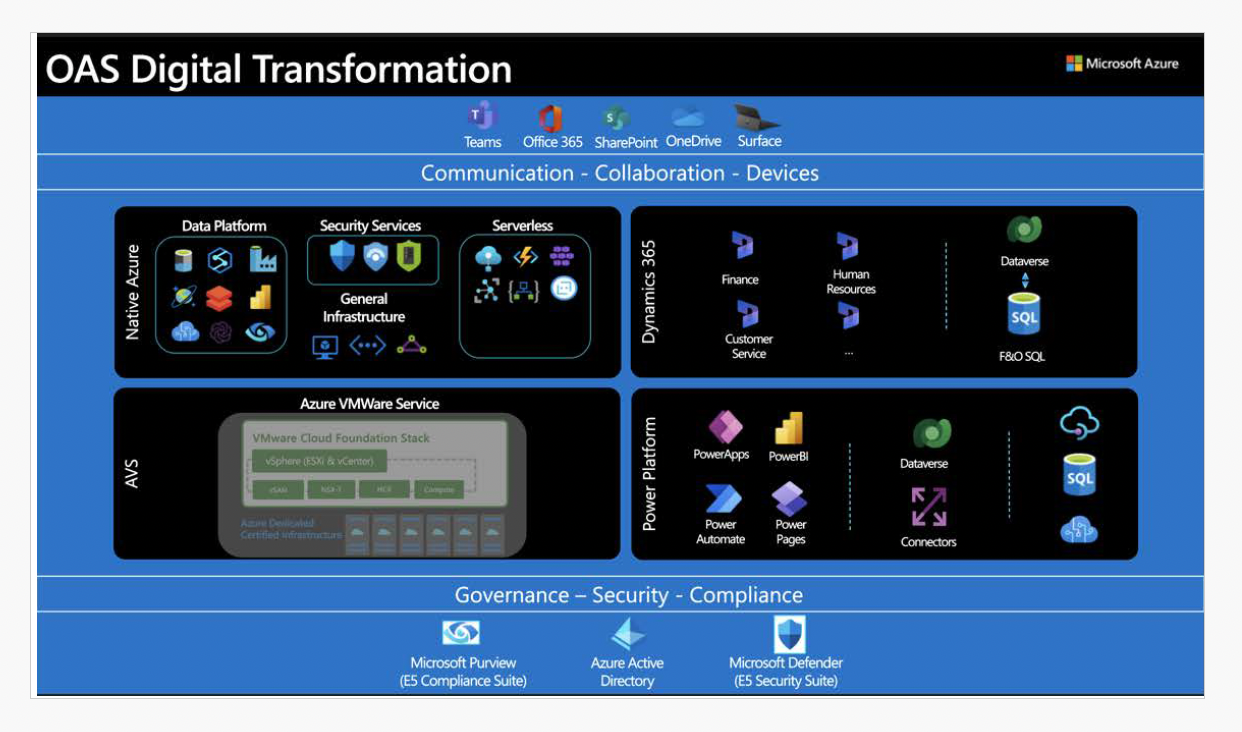
Tying It to Microsoft Dynamics and Power Apps
Dynamics 365 and Power Apps were the backbone of the OAS transformation. Dynamics 365 Finance & Operations replaced our ERP, while apps like Customer Service and Marketing streamlined operations. Power Apps filled gaps with low-code solutions—like a compliance tracker—reducing technical debt and enabling rapid deployment. Its connectors linked Azure services and Dynamics data, making it a linchpin as Dynamics matured. This duo positioned us for future enhancements, like OpenAI integration, while empowering citizen developers to own their tools.
Why This Playbook Matters
This isn't just a story—it's a proven approach. I delivered a full Microsoft Architecture at OAS, balancing technical execution with stakeholder alignment. Whether you're modernizing apps, building analytics, or automating processes, this playbook offers a path forward. It's about results: efficiency up, costs down, users happy. That's the transformation I led, and it's the one I can lead again.